Agile Elephant making sense of digital transformation

innovation | digital transformation | value creation | (r)evoloution

  • Email
  • Facebook
  • Google+
  • LinkedIn
  • Twitter
  • Home
  • Manifesto
  • Services
    • Our Approach
    • Our Services
    • Making Collaboration Work Packages
    • Collaboration Solutions
    • Our Experience
    • Workshops
    • Innovation
  • About Us
    • The Team
    • Why we do what we do
    • Why are we called Agile Elephant?
    • Our Partners
    • Our Clients
  • Get Involved
    • Events
    • Meetups
    • Unconference
    • Newsletter
  • Resources
    • What is Digital Transformation?
    • What is the Digital Enterprise Wave?
    • Our Research
    • Case Studies
    • People We Follow
    • Articles & Links
    • Books That Inspire
  • Blog
  • Contact Us
Home Archives for software tools
Avoid the Spreadsheet Swamp with a Low-Code approach

April 26, 2017 By David Terrar

Avoid the Spreadsheet Swamp with a Low-Code approach

We all know that digital transformation is here and happening whether our particular business likes it or not. Along with competition from smarter, nimbler competitors and the digitisation of business models we’ve also got new compliance “threats” to worry about, and GDPR is the big one we’re starting to hear some “Y2K” like scaremongering and noise about. General Data Protection Regulation (GDPR) is actually EU Regulation 2016/679 and every UK company does need to be worrying about it as it (and the associated fines) apply to all of us from 25 May 2018. We’ll be discussing ways to tackle this over the coming months, but the problem triggered me thinking about the spreadsheet swamp that we’ve been living in for over 30 years. The first thought for so many business people when faced with a new requirement for tracking and reporting something that isn’t handled by our current systems is to reach for a spreadsheet. We’ve been conditioned in to doing that since the 70s and in today’s environment there are social tools and a whole new category of solutions called Low-Code platforms that you should consider before clicking that Excel icon.

We’ve been running our businesses and organisations with incomplete ERP systems for decades – they usually cover most of a company’s core processes but leave plenty of gaps. Those of us who have been around in IT for a while will remember enterprise software names like McCormack & Dodge, MSA, Dunn & Bradstreet, Pansophic, ASK, Baan and more – generations of ERP and enterprise level application software companies that have come and gone but were World players in their day. These (and the current) ERP solutions cover the easily repeatable processes that need to be handled, but most businesses also need to deal with what my friend Sigurde Rinde calls barely repeatable processes. That’s everything from the day to day business events that don’t quite obey the specific rules that we planned for, to responding to competitive threats, to new requirements like GDPR. That’s digital disruption in its many forms – the reality of business in a complex, fast changing world.

How do we deal with these gaps in functionality that our conventional systems don’t cover? To help us get the answers that the core IT system doesn’t provide, right since the dawn of personal computing, we’ve been reaching for the spreadsheet! It started back in the late 70s. What was the application (along with word processing) that helped the Apple II become so fantastically popular when it changed the computing landscape? It was Dan Bricklin‘s VisiCalc – the first ever spreadsheet. After the Apple II the IBM PC came along in 1981 and Lotus 1-2-3 became the goto application, but as Microsoft began to shape the technology landscape then Excel took over to became pervasive. Generations of people in business have built up a literacy in creating data based applications, with calculations and macros sitting in spreadsheets, with ad hoc systems and processes around them to share them with groups of people by email. How did accountants and business people end up as part time programmers? However, in truth this was a real jump in personal productivity and getting things done. But 30 years on we’re still doing it with pretty much the same technology – there has to be a better way!
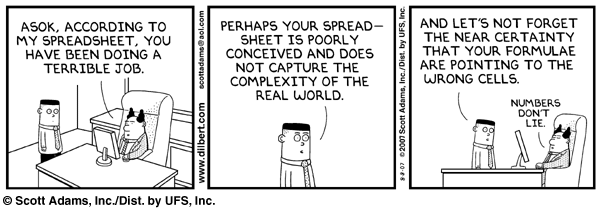
With the advent of social tools over the last 10 years or so, I was convinced we could break the spreadsheet and email habit and make businesses more effective. We talk a lot here about enterprise social networks and how these kinds of collaboration tools should be at the heart of any company’s digital transformation strategy, but let’s turn to that spreadsheet. At the very least our documents or spreadsheets can be properly shared by a group of users. We don’t have to have multiple copies of the same thing, getting out of date, sitting in every single email recipient’s inbox – who’s got the latest version? Wikis, Google’s G Suite, Office365, and even new products like Dropbox Paper mean we can collaborate on content in real time, but even with these tools to hand many businesses are still living in the spreadsheet swamp. Spreadsheets have their place, but too often they are used as a convenient repository for what is actually a database for collecting and reporting on information that is vital, but missing from the organisation’s core ERP systems. They are used for everything from product lifecycle management to contact management to human resources data. Actually these applications ought to have been created as a proper database, but the cost and time of set up and management means that the user goes a different way. As a medium for data storage spreadsheets are mightily insecure. Anyone who has access to the sheet could change the data layout, change the data, screw up the calculations. Even when carefully managed, with good intentions, there are many examples you can find of huge mistakes and big losses because of a spreadsheet error. As my good friend Dennis Howlett often says:

“Spreadsheets are general purpose tools that can do many powerful things but they are a programming environment and should be treated as such. That means testing and documenting according to good programming standards.”

Why do we let ourselves navigate in to this swamp without that mode of thinking? This is where a new category of applications, called Low-Code platforms, is springing up to provide a 21C, more safe, more secure, cloud native solution to these ad-hoc needs that every organisation is faced with. This is an emerging space, and we’ll be looking at it more over the coming months. The way I see it the current crop of products that allow you to build applications with no (or very few) lines of code fall in to two broad categories. Business Process Management apps that help implement business logic and workflows, and Data Driven apps that offer data management, reporting and data integration. There is overlap of course, and a whole range of user experience from drag and drop interfaces to more straightforward tabular set up and configuration.

This Thursday I will be working with the Ctrl O Team and their Low-Code solution called Linkspace, at a London event titled “Government Computing Presents: Digital Transformation for the Public Sector”. The event blurb suggests that with efficiency and modernization at the forefront of government policy, the need to share experiences, success stories and new ways of working has never been greater. Listening to our senior public sector contacts there is no doubt that Government suffers from the spreadsheet swamp just as much as the commercial world. As I said at the start we need new thinking to tackle digital disruption, and new Low-Code tools provide rapid development without upfront costs, and should definitely be part of your 21C kitbag for application development and delivery.

As a Low-Code example, Ctrl O’s Linkspace allows you to build your own data driven applications in a secure way on a cloud platform that can be accessed anywhere from any device. You create your data layouts, data entry forms, workflow, and reporting. You need no more technical expertise than for spreadsheets and office products, but Linkspace helps you lock down the security so that only the right people have access to add, change or delete things. Ctrl O is an independent UK cloud software provider who already work with a number of government departments. They are passionate about using open source tools to create lean, intelligent, unbreakable products. I’m delighted to be working with them. Go here if you want to find out more about how they deal with the spreadsheet swamp. More details on the Government Computing event can be found here. Please come and talk to us on Thursday.

Disclosure: David Terrar chair’s Ctrl O’s Advisory Board and Agile Elephant helps them on strategy.

Share this:

  • Tweet
  • Email

Filed Under: agile business, events, Low-Code, software tools Tagged With: Ctrl O, Excel, rapid application development, spreadsheet, spreadsheet hell, spreadsheet swamp

Microsoft Teams and Slack point to the future of collaboration

November 3, 2016 By David Terrar

Microsoft Teams and Slack point to the future of collaboration

Yesterday Microsoft responded to the incredible rise of Slack, the cool “new kid on the block” inter office chat app, with Teams. I watched the live stream of the announcement and was surprised. I expected a Slack alternative, a “Slack killer” even, but what they’ve announced is much more significant. Teams and Slack together signpost the future of collaboration and the evolution of the digital workplace. The collaboration and enterprise social network software providers need to take notice.

Over on Hewlett Packard Enterprise Insights, their enterprise.nxt guide to digital transformation, they published my post “5 things Slack and Microsoft Teams tell us about workplace collaboration”. This is a companion piece, amplifying those conclusions having had a chance to think through the implications of what I saw streamed from yesterday’s Microsoft NYC Office event.

screenshot-2016-11-03-17-39-57Earlier in the year it had been rumoured that Microsoft might buy Slack for $8Bn, but they’ve done their own thing instead. Yesterday’s announcement was an open secret for a while, and Slack took the rather interesting step of publishing a full page advert in the New York Times, simultaneously publishing the text on Medium. They say they are excited at the competition, but that’s more in the context of the purported Chinese curse “May you live in interesting times”.

First let’s run through what Slack have achieved, which is pretty incredible really! They’ve only been around since August 2013. You probably didn’t know that the name is an acronym, “Searchable Log of All Conversation and Knowledge”. Slack has $540m in funding and a valuation of around $3.8 billion at their last funding round in March, and then we had those Microsoft rumours. Back in May this year Slack passed 3m daily active users, but that was 3.5 times growth in both free and paid for users over the previous year, and the rate isn’t slowing down (so even with Microsoft’s announcement, Slack won’t be going away). As I explained in the HPE article, Slack is used by 77 of the Fortune100. There are teams inside eBay, Ogilvy, Salesforce, Samsung, and Urban Outfitters. IBM themselves have 30,000 users, and have even announced a partnership with Slack so Watson’s AI can quickly provide insights from the huge data sets collected by the messaging system. Slack is being used by large enterprises, small enterprises, by groups of developers sharing code snippets, and it’s even gaining traction in the gaming community.

Like so many web based products of recent years that we know and love, such as Twitter or Flickr, it is the result of a company doing a pivot from their original intention. Stewart Butterfield and his team were working on an online game called Glitch. They had developed their own internal messaging system, and when the online game didn’t succeed, they launched their internal collaboration solution instead, to become the cool product platform that it is now. They have the classic freemium business which has made it easy for groups of users, frustrated with whatever collaboration options they have within their enterprise, to set a Slack group, invite people in and provide their own tactical solution to help a particular community, issue or project. There are plenty of other options around like HipChat in the business world, or Discord in the gaming community, but in a very crowded market of overalapping communication tools, Slack have made a big impact inside 3 years.

Let’s look at what Slack actually provides a group of users. The functionality covers three areas:

  • A message threading alternative to email that is device independent. I can use it on Mac, Windows PC, through a web interface, or with mobile apps for smartphones and tablets. Conversations are synced across all devices so I can join the conversation in one place, and continue on a different device when I’m on the move or back at the office.
  • It has a more open communication approach – the conversations get organised within channels that are like the hashtags I’m used to on public social media platforms, and everything is searchable so that I can easily loop in the skills and people I need.
  • The third key area is Slack’s focus on helping me with menial tasks. They have a growing directory with over 750 apps, chatbots and algorithms that I can deploy to help make my collaboration life that little bit easier. Slack are riding the growing wave of Bots, Machine Learning, Artificial Intelligence and Robotic Process Automation – a mega trend that is changing office work just as much as automation has on the shop floor.

But wait, there’s more. I mentioned sharing code snippets, but those 750 apps include easy integration with developer and agency friendly tools like Trello, IFTTT, Zapier and GitHub. They are also investing in people to help them scale with senior hires from Salesforce and Foursquare this year.

Slack’s success highlights a key problem for our existing collaboration software options. They are more difficult to use than they should be. On top of that, the digital workplace is a mess. Alongside whatever we use for team collaboration, we access a whole host of disparate corporate systems with differing interfaces to get the job done. Slack has the ease of use and frictionless set up of the consumer apps we all used to on our smartphones and tablets. On top of the user experience there are two more factors. First, team chat functionality which allows me to find, connect and communicate with the right experts helps me get the job done. It’s a core component of all the administration and knowledge work we do. Second, and the masterstroke, is the open platform which provides the store of bots and integrations to third party apps. It means Slack (or Teams) provides me with a place where work happens. Where I can connect to these disparate app silos that my company uses, but in one place where the useful conversations are already happening. This is the starting point for a proper digital workplace, or what Dion Hinchcliffe called a digital workplace hub in his post on ZDNet a few days ago.

More than anything with this team chat based digital workplace approach, I’m looking forward to the demise of email, and products like Slack and Teams bring that a little closer. Having discussed the incredible rise of Slack, the functionality it provides, and some of the reasons why it’s been successful, what did Microsoft give us in response?

screenshot-2016-11-03-17-43-53

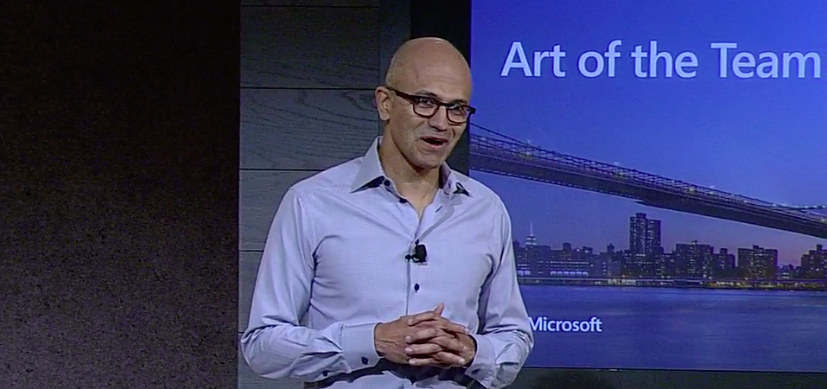
Yesterday, CEO Satya Nadella and Office Corporate VP Kirk Koenigsbauer, with a little help from their friends, laid out the new strategy and provided an impressive demo of Microsoft Teams. From my initial take it has many of the good characteristics of Slack, certainly has a similar look and feel, but offers the potential of more through tight integration with the Office365 family of products that it sits in, and becomes the front end to. Satya opened the announcement talking about how the new product needs to accomodate how different teams work differently, using the example of jazz ensembles, crew races, and even cricket teams, and that sets up the fact that the product allows you to customise the experience on a team by team basis.

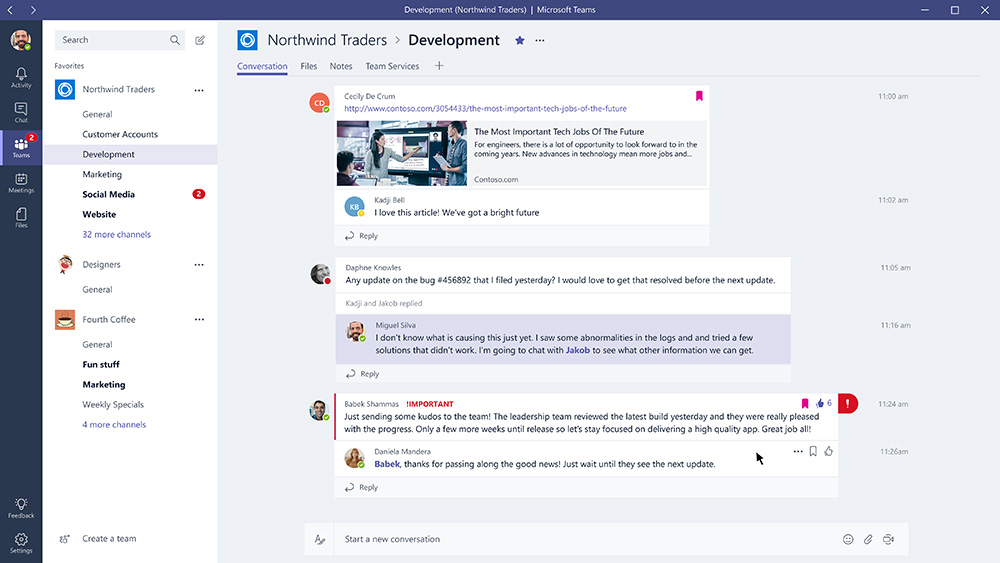
Getting in to the demo helps explain what Teams does. Over on the left of the screen there are tabs for activity, chat, teams, meetings and files. This bar moves to the bottom in the mobile experience. When you set up a private team, a Sharepoint is automatically provisioned “behind” it to support it, and so any files are put there or created there. The team space showed normal multithreaded conversations, and I rather liked the way messages to you were highlighted with a red tab/tag over on the right of the message. You can open files or notes within the stream, and have conversations around them. Of course (the rather excellent) OneNote has all the characteristics of a wiki for co-creation. When you go in to a team space, you can pin things on to the tabs across the top of the space. Things like the budget for this project (an Excel spreadsheet), a planner for this project team, or even third party tools like Zendesk, accessed right there. This access to, and seamless integration with, the whole of the Office365 suite, or things like Microsoft Power BI, and on top of that a set of third party apps too, is crucial. Teams acts like your inbox, or maybe it’s a workbox, or maybe it’s your digital workplace hub.

When it comes to typing your messages you can add emojis, stickers, or attach files. A ‘Fun Picker’ lets you find and add Giphy GIFs, or memes. The next thing to say is that you can interact with bots just like in Slack. T-Bot sits on top of  Teams’ help system, so you can ask questions like “how do I create a channel?”. WhoBot links in to the directories, and more importantly the conversations and meta data associated with that person, so you can ask “who knows about ticket sales?”. You can jump in to video chat with the team right there, using Skype.

threaded-conversations-in-microsoft-teams-web

Microsoft Teams is available now as a customer preview in 181 countries and 18 languages. General Availability is planned for Q1 2017, when it will have 85 Bots, 70 connectors, and integrations with 150 partners including Zendesk and HootSuite. In terms of licensing it is available to any user on an O365 Enterprise or Small Business plan. One key point that Satya emphasised is that Microsoft already have 85million active users of O365, and this is the market they are addressing.

Microsoft Teams looks like a very good team chat option, but it has important advantages if you are already following an Office 365 strategy. Both Slack and Teams bring you to a place where you can connect and collaborate with overlapping teams to get things done. They both plug in to the rising trend of bots and AI to automate tasks, find answers quickly and easily, and save time. They both offer an array of integrations with other business apps and so begin to provide a practical answer to Dion’s digital workplace hub. They definitely point the way for the next stage of collaboration solutions, and the major social software players need to take note.

Find out more about this year’s Enterprise Digital Summit London:

eds_blogteaser16

Share this:

  • Tweet
  • Email

Filed Under: collaboration, Enterprise Social Network, social tools, software tools, Uncategorized, workplace Tagged With: IBM, Microsoft Teams, Satya Nadella, Slack, Stewart Butterfield

Behind the scenes – how IBM supports Wimbledon

July 3, 2014 By David Terrar

Behind the scenes – how IBM supports Wimbledon

Last week I was privileged to be invited behind the scenes to IBM’s Social Media Command Centre at Wimbledon to see how cloud, social and mobile technology can combine to make a really significant impact for everyone involved in one of the premier World sporting events of the year. I actually spent 2 or 3 hours talking to people and looking at an array of state of the art software solutions in “the bunker”, accessed from the basement of the broadcast centre right under some of the Wimbledon tennis courts.  I must thank Andrew Grill, IBM’s Global Partner, Social Business who invited me, and Sam Seddon, the IBM Client Executive for Wimbledon, who showed me around. I did get to see some great Tennis from Nick Kyrgios and Eugenie Bouchard (two stars of the future!) while I was there, but being a Tennis fan was secondary to the rather awesome, geeky stuff underground.

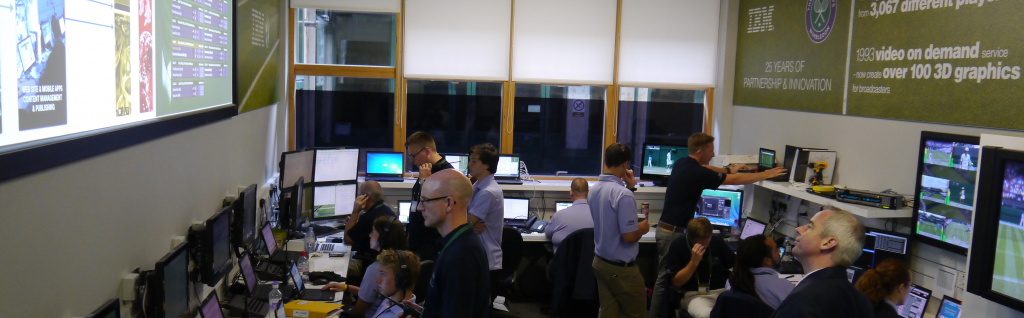
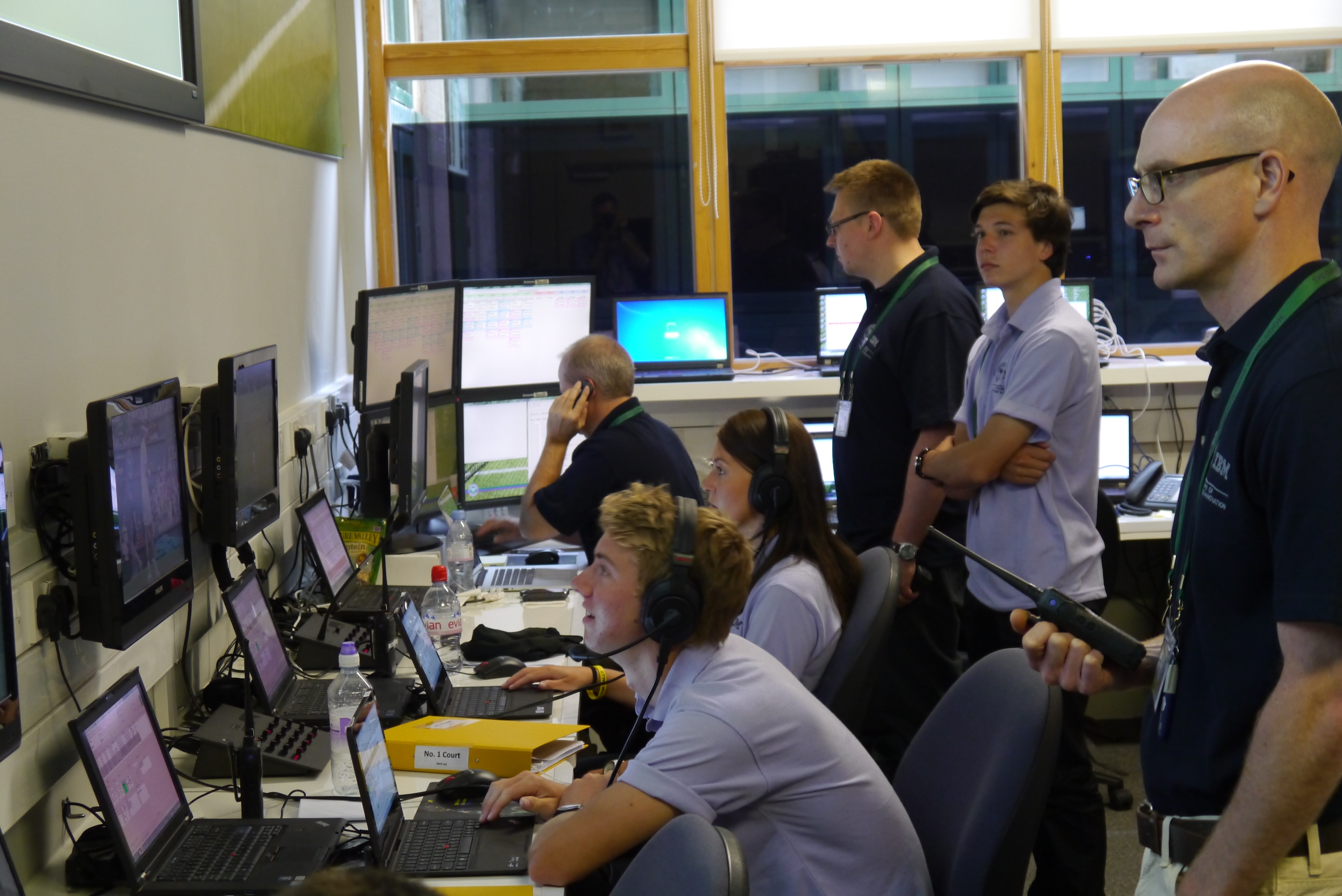
IBM's Social Media Command CentreSam has a team of around 200 supporting Wimbledon using an impressive array of terminals and technology on site, supplemented by an enormous amount of Cloud compute power from data centres in Amsterdam and the USA.  They are providing a service to the All England Lawn Tennis Club to help make Wimbledon the premier sporting event, but in doing so they are serving the audience at the ground, fans around the World, the radio and TV broadcasters of the event, the event sponsors, the Club itself, and even the players directly.

On each court they have experienced tennis players with special terminals collecting near real time data of each match, point by point – 3 on Centre and number 1 court, down to 1 person on the outside courts.  They need a tennis savvy operator to differentiate a forced error from an unforced error and that kind of thing.  On courts where Hawk-Eye technology is used they take a direct feed from that too. This year, for the first time, they are tracking the speed of the ball, how near it bounces to the line, how far a player is pulled out of position so they can classify aggressive play versus passive play.  They manage all of the video feeds from every court and add data feeds to them for external broadcasters.   They take social media data from Twitter’s Gnip feed – this is the “firehose” of data that gives them batches of geotagged Tweets every 5 minutes which can be tracked to their country of origin, or right down to the actual court within Wimbledon itself.  On top of that they have all of the historical data collected on every player and every match during the 25 years they have working with Wimbledon, plus the club data going back to the very start of the event.

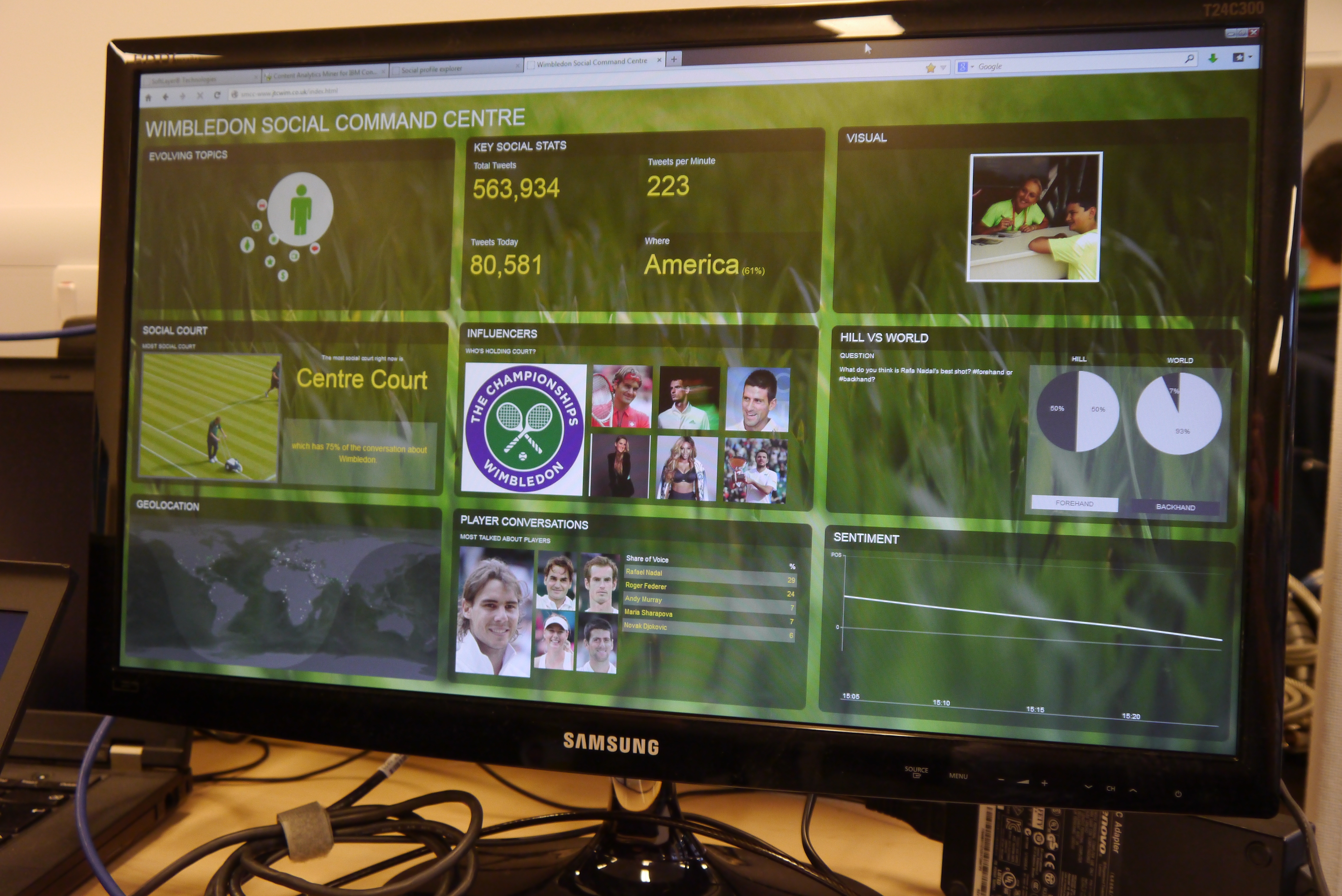
I spoke with Chris Thomas, Solution Architect – Big Data and Analytics at IBM, who is the guy in charge of the team and analytic technology making sense of this huge mass of social and digital raw material.  They use IBM Watson Content Analytics and other software components to provide the club, broadcasters and other users a dashboard with 9 views – Evolving Topics, Key Social Statistics, Visual, Social Court, Influencers, Hill vs The World, Geolocation, Player Conversations, and Sentiment.  Chris has created a collection of simple but powerful queries which then provide a visualisation of what is happening, and trends over time.  From the dashboard a user can dive in to the detail, and then track back through the history to a Tweet conversation on particular date/time or to player statistics at previous tournaments right back to the start.  All incredibly impressive and in terms of business analytics or social media monitoring this is deep functionality, directly applicable to just about any business.

They track Tweets by geography and can see how a particular social media conversation goes viral, and spreads country by country over time.  They can see who are the most influential on Twitter, be it players, fans, journalists or pundits, and track the engagement around particular players, matches or specific incidents happening in real time. They look at timeliness, authority, followers, and global reach.  For example, one Tweet from Roger Federer was retweeted 1,520 times within 30 minutes. Each tweet from the Gnip feed contains a lot of meta-data. They track time, latitude, longitude, sentiment, the relative volume from that location and filter by player.  There are bursts of activity they need to handle – in the final they will be collecting 6-700 Wimbledon related tweets a second!  In terms of sentiment analysis, Watson uses natural language processing to help them identify, understand and categorise things properly.  As well as tracking players and fans they have introduced a couple of new concepts this year.  The Social Court assigns tweets to a particular court and shows the user when something special is happening.  Hill versus The World is a great new idea.  The audience sitting on Wimbledon’s Henman Hill, Murray Mound or whatever you call it can be asked questions on the big screen.  The same questions get asked on social media around the World.  Then they track the difference in sentiment and engagement between the audience on the hill in the ground versus the audience in the rest of the World.  They’ve also added a visual feed, from trusted photographic sources, which provides extra player and fan related content for the users.  They’re being very cautious with this as Wimbledon.com and the AELTC can only be described as conservative when it comes to some of the images people put out there!

Chris’s team provide the dashboard to users on site, XML feeds out to the World, data feeds that combine with video for the broadcasters, and feeds that go directly to the Wimbledon.com website and the Wimbledon mobile app. IBM provide the website and the app, and you should compare Wimbledon to other tournaments and Grand Slams around the World. As a Tennis fan I have no doubt that the site and app have by far the best user experience for finding your way around and answering the key questions about a particular player, where they are at in the draw, order of play and the like.  They do the basics right, but then add a huge amount of great content on top of that.

P1030362I spoke to Alexandra Willis, the Club’s Editorial Content Manager.  She is probably the key customer being served by that analytics dashboard.  She uses it to make real time decisions on what content she should be providing to the website, the mobile app, and Live @ Wimbledon – their on site radio and TV channel that also gets published on the website.  It helps her spot problems that might be happening, say, in the queue or around the ground so they can be actioned.  She can spot an incident happening which might be a great opportunity to pull in one of the sponsors for more exposure or to help solve an issue.  They want to do much more than just recycling Tweets on a screen (which is the social media “monitoring” norm for so many events).  She is particularly delighted with how she can use Hill versus The World, or use the visual feed to pull in fan photos from around the ground (and elsewhere) to add another dimension to their content.  The day I was there there was a still lot of buzz about Shaquille O’Neal (who doesn’t tweet much, and didn’t at all from Wimbledon) but he was on centre court the day before.  Actually the tweet buzz had been generated by an Andy Murray BBC article about meeting him the day before, but just published that morning.  Alex tracks activity, events and sentiment like that by country – so far America has been the most engaged social media audience from day one and the male players get significantly more attention than the females.  She uses the reports produced by IBM around share of the voice to feed the Live @ Wimbledon channel and help serve the audience, fans, her sponsors and the club to keep her event right on top.

The players aren’t ignored in all of this.  I met some of the many young and enthusiastic, IBMers in their twenties who put themselves forward to a heavily oversubscribed list to come and support the event.  They have relaxed periods where they can hang around and watch tennis, but at the end of each allotted match they dive in to action for an intense half an hour of work.  They edit all of the match footage for the player, and collate all of the match statistics and social media data on to memory stick, which they have to get to that player within 30 minutes of the end of the match.  The player can then track back to particular points in the match, see what was going on, their errors, how aggressively they were playing or not, and learn from it to prepare for the next match.

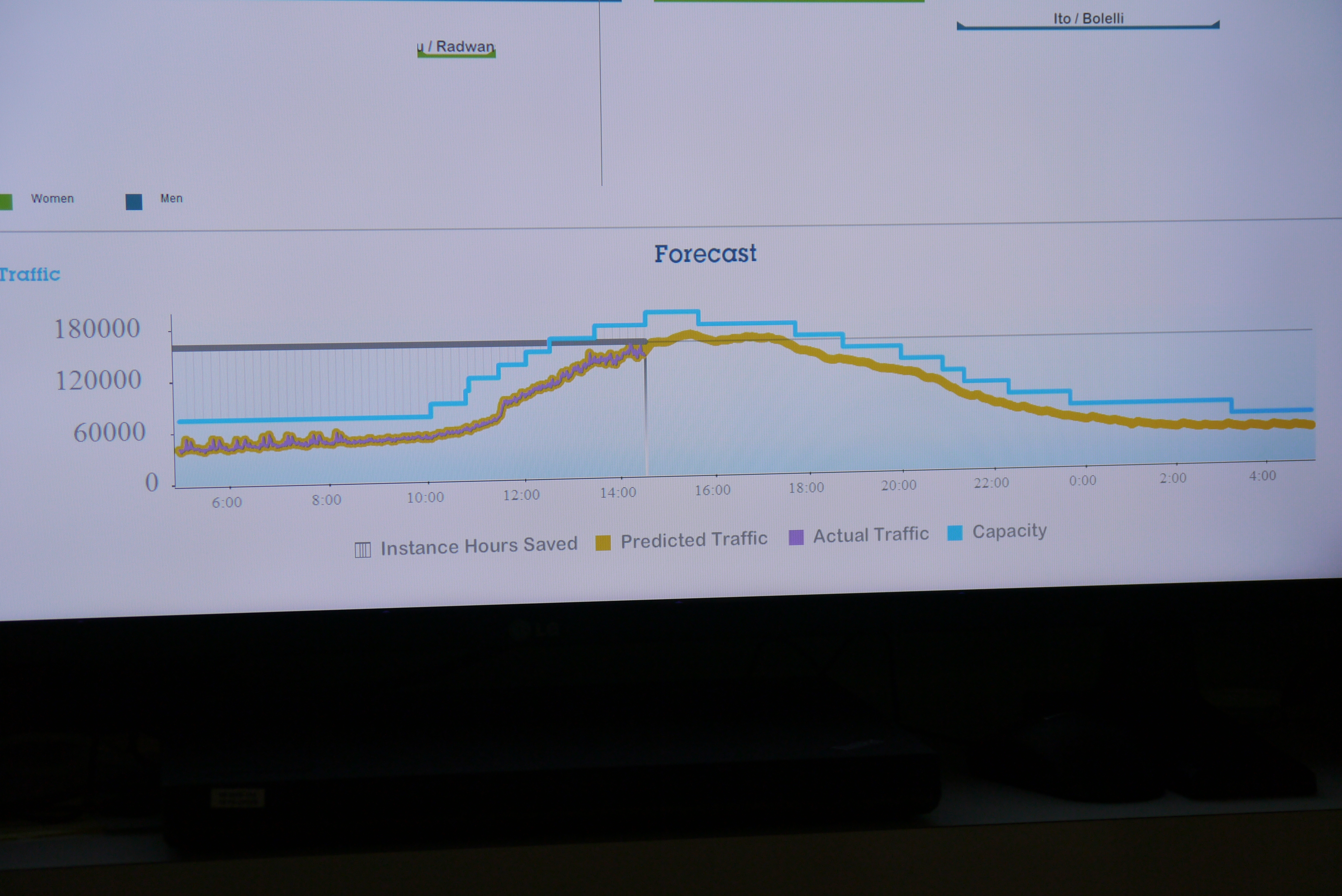
P1030359Here are my Flickr photos of the bunker, with all of the kit and example screen displays.  IBM install a lot of equipment on site for the two week event, but the lion’s share of the horsepower required to drive the website, the dashboards and the underlying analytics come from the Cloud.  Much of the Social Media monitoring is handled by Softlayer, supported from Data Centres in the Netherlands.  The compute power for the website and the analytics comes from 3 data centres in the USA.  This photo shows the monitoring screen in the command centre where the actual capacity used is being tracked, then a prediction of what capacity required is being calculated, and then the blue line above those two shows the actual resources that are in place so that the operators ramp up the capacity in line with peaks well before they happen.  A fine example of what is behind elastic computing in practice.

So the Wimbledon tennis, atmosphere, strawberries and cream were all great, I was more impressed by IBM’s Social Media Command Centre.  It’s a real showcase of how the latest technology can be applied to add real value for all of the stakeholders in an organisation.  It happens to be supporting a sporting event, but the key messages are generally applicable.

(Disclosure: IBM provided me access to the Ground and a fine Court 1 ticket, but no other expenses/fees) 

Share this:

  • Tweet
  • Email

Filed Under: agile business, data analysis, social business, social media monitoring, software tools

Sign up for our regular Agile Elephant Newsletter - news, posts, ideas and more.

My Tweets

From the Agile Elephant Blog

  • The Metaverse doesn’t exist yet, but…
  • Impossible Things get Disruptive
  • Clarity, Cloud, and Culture Change at IBM

What Next?
Take a look around our site, check out our approach, see how we can help, join the conversation on our blog or contact us to find out more.

About Us

Agile Elephant is a new kind of consultancy designed to help companies embrace the new digital culture of social collaboration, sharing and openness that is changing business models and the world of work.

Contact us to find out more!

Our founder's blogs:

broadstuff

@DT on Medium

Technotropolis

Our blog:

The Agile Elephant Blog

Site Log In | Site Log Out

Subscribe to Site RSS

Subscribe to our Blog via Email

Enter your email address to subscribe

Join 30 other subscribers

Copyright © 2026 ·Streamline Pro Theme · Genesis Framework by StudioPress · WordPress · Log in